 Maximilian Roos
89326f14af
Maximilian Roos
89326f14af
Guides and site presentation: one home per topic, a shell-integration
page, a footer, and three rendering fixes.

**Global options were emitted once per command reference**

clap repeats the same ~20-line `Global Options:` block in every
reference it renders, so a page assembled from subdocs stacked 11 copies
on `/config/` and 13 on `/step/`. That padded the pages and gave site
search that many near-identical hits — "squash" returned both
`#command-reference` and `#command-reference-2`. `take_global_options`
cuts each reference at the heading as it is built, keeping only the
first; one `kept` flag threads through the subdoc expansion and the page
streams out rather than accumulating. Terminal `--help` renders through
clap directly and is unchanged.

The config page also carried colliding anchors — two "Hooks" (`#hooks`,
`#hooks-1`), two "Aliases", and seven "Examples" (`#examples` …
`#examples-6`) — now qualified at their source in `src/cli/config.rs`:
User/Project hooks, User/Project aliases, and
Approval/Alias/State/Cache/Log/Variable examples.

`/step/` still has its own set (eight "Examples", two "Options", two
"Arguments", plus "Staging" and "Dry run" pairs). Qualifying those moves
existing `/step/#examples-N` anchors, so it wants a pass of its own with
the inbound links audited; the deduplication above already removes 13
Global Options blocks from that page.

**Shell integration has a page**

Shell-integration debugging was skill-only: five named warning messages,
a PowerShell checklist, and the wrapper mechanism, with no site page —
while the FAQ's answer to "`wt switch` didn't cd" was to install the
Claude Code plugin. It is now `/shell-integration/`, offered first, with
the plugin as the second route. The `llms.txt` listing serves every page
as `/<slug>.md` from a hand-created symlink, so a new page was a 404 the
listing still advertised; the symlink is added and the sync now fails
when a listed page has none.

**Presentation**

- A site footer carries the version (read from `Cargo.toml` at build
time), releases, changelog and license. No page named any of them, and
`/code-signing/` was reachable only from inside a collapsed block on the
homepage. Starlight's `Footer` is wrapped rather than replaced.
- `wt list --full` renders 1157px inside an 800px content column, so 40%
of it sat behind a horizontal scrollbar with the pane beside the column
empty. A terminal frame now takes the whole pane where there is slack,
measured with a query container rather than recomputed from Starlight's
layout formula.
- The `wt-command-reference` frames offered a copy button for 3,877
characters of generated help text; they now expose no copy control. A
console block listing several commands is as often a menu of
alternatives as a recipe, and nothing in the markup tells them apart, so
every command line in such a block carries its own copy control
alongside the block's.
- The four command demos and the two hand-written figures get captions;
the 2.33 MB homepage GIF below the fold loads lazily.

**Sidebar order is pinned**

`site-navigation.mjs` told readers a
`test_sidebar_matches_frontmatter_order` would fail when the authored
sidebar and the pages' `sidebar.order` disagreed. No such test existed,
and the disagreement it describes is exactly what the survey found:
`remove` listed before `merge`, Agent integration ahead of
lower-numbered pages. The test is written, so the sidebar and the
`llms.txt` ordering derived from the frontmatter can't drift apart
again.

<details>
<summary>Guide corrections</summary>

- Tips & patterns was 26 flat H2 recipes in no order, all 26 in the
sidebar. They group under five H2s — setup and layout, aliases and
hooks, per-worktree services, working with agents, status/commits/logs —
with each recipe demoted to H3. Anchors are level-independent, so
existing `/tips-patterns/#…` fragments still resolve.
- `-x 'opencode run'` has been broken since 0.75.0 made `-x` a literal
program: it is `-x opencode -- run '<task>'`.
- The branch-summary preview moved from tab 5 to 6 when the unified-diff
tab landed; the recipe names the `summary` tab instead of a number.
- The Caddy recipe claimed `feature-auth` hashes to port 16460 — that is
`fix-auth`'s port. It is 18283.
- `_` in `wt list` is same-commit *and clean*; the
same-commit-with-changes glyph is `–`, which is not safe to delete.
- `wt step prune` removes branches with no worktree too, and the min-age
guard ages a worktree by its creation time and a bare branch by its
oldest reflog entry.
- `wt step eval -v` prints fifteen variables; the example showed two
under a lead calling them "the available template variables".
- A filter applied to `{{ vars.<key> }}` acts on the placeholder the
preview substitutes, so `{{ vars.port | default('8080') }}` previews as
`{{ vars.port }}`, filter gone.
- The `.git/wt/cache/` table was missing `picker-preview`, and `wt
config state clear` prompts unless `--yes`.
- `skills/worktrunk/reference/README.md` was a symlink to the repo
README that `SKILL.md` never referenced, and the plugin mirror
dereferenced it into a 262-line copy carrying the star-history token,
share links, and a logo path resolving nowhere. Nothing generated it, so
deleting the symlink is the whole fix.
- One home per topic: agent handoffs stay in tips-patterns, activity
markers in `claude-code.md`, alias-template deferral in `extending.md`,
and the `codename` filter's two `worktree-path` recipes give way to the
config page that owns path templates. The FAQ's "Running tests" and "How
can I contribute?" duplicated the README's Contributing block down to
the share URLs.
- The FAQ linked `/worktrunk/#install`, the `noindex` compatibility
route; the plugin hook shim's Windows Terminal hint pointed there too.
Both use `/#install`, where the new sidebar Install entry goes.
- Example names settle on `myproject` / `feature-auth`; "sibling to main
repo" becomes "sibling to the main worktree", and `wt remove`'s "target
worktree" becomes "the worktree being removed" per the project's own
terminology rule.

</details>

UX survey items: `#36`, `#37`, `#38`, `#39`, `#45`, `#47`, `#48`, `#49`,
`#50`, `#51`, `#52`, `#61`, `#94`, `#95`, `#96`, `#97`, `#99`, `#100`.

Reviewable files: the hand-written pages under `docs/src/content/docs/`
(notably the new `shell-integration.md`, `tips-patterns.md`, `faq.md`),
`docs/src/components/Footer.astro`,
`docs/src/plugins/worktrunk-terminal.mjs`,
`docs/src/site-navigation.mjs`, `docs/tests/*.mjs`, `src/help.rs`,
`plugins/worktrunk/hooks/wt.sh`. Generated mirrors and snapshots are
regenerated.

> _This was written by Claude Code on behalf of max-sixty_

🤖 Generated with [Claude Code](https://claude.com/claude-code)

https://claude.ai/code/session_01XAUYWFN9d9oh6jyoQiouHb

---------

Co-authored-by: Claude Fable 5.1 <noreply@anthropic.com>
 Worktrunk







September 2026: Worktrunk was released at the start of the year, and has quickly become the most popular git worktree manager. It's built with love (there's no slop!). Please let me know any frictions at all; I'm intensely focused on continuing to make Worktrunk excellent, and the biggest help is folks posting problems they perceive.
Worktrunk is a CLI for git worktree management, designed for running AI agents in parallel.
Worktrunk's three core commands make worktrees as easy as branches. Plus, Worktrunk has a bunch of quality-of-life features to simplify working with many parallel changes, including hooks to automate local workflows.
A quick demo:

📚 Full documentation at worktrunk.dev 📚
Context: git worktrees
AI agents like Claude Code and Codex can handle longer tasks without supervision, such that it's possible to manage 5-10+ in parallel. Git's native worktree feature gives each agent its own working directory, so they don't step on each other's changes.
But the git worktree UX is clunky. Even a task as small as starting a new
worktree requires typing the branch name three times: git worktree add -b feat ../repo.feat, then cd ../repo.feat.
Worktrunk makes git worktrees as easy as branches
Worktrees are addressed by branch name; paths are computed from a configurable template. Commands that take a branch also accept the path of the worktree it is checked out in.
Start with the core commands
Core commands:
| Task | Worktrunk | Plain git |
|---|---|---|
| Switch worktrees | wt switch feat |
cd ../repo.feat |
| Create + start Claude | wt switch -c -x claude feat |
|
| Clean up | wt remove |
|
| List with status | wt list |
git worktree list (paths only) |
Expand into the more advanced commands as needed
Workflow automation:
- Hooks — run commands on create, pre-merge, post-merge, etc
- LLM commit messages — generate commit messages from diffs
- Merge workflow — squash, rebase, merge, clean up in one command
- Interactive picker — browse worktrees with live diff and log previews
- Share build caches — ten worktrees get
target/,node_modules/, etc without building or copying them (on APFS, btrfs, and XFS) wt list --full— CI status and AI-generated summaries per branch- PR checkout —
wt switch pr:123to jump straight to a PR's branch - Dev server per worktree —
hash_porttemplate filter gives each worktree a unique port - Aliases & per-branch variables — custom
wt <name>commands and branch-scoped state for hook templates - ...and lots more
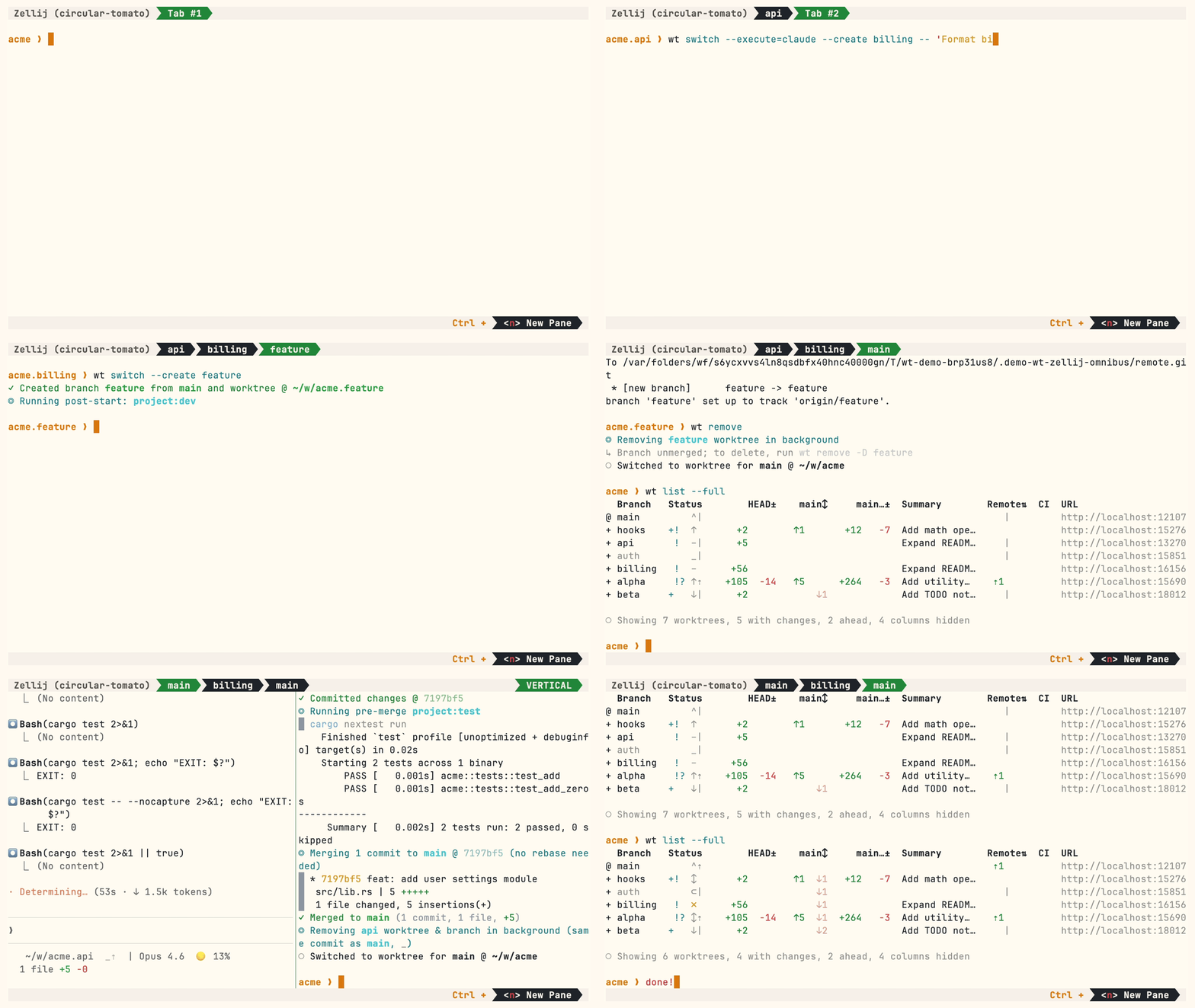
Multiple parallel agents, same simple commands:
Install
Homebrew (macOS & Linux):
brew install worktrunk && wt config shell install
Shell integration allows commands to change directories.
Cargo:
cargo install worktrunk && wt config shell install
Windows & other
Windows. wt defaults to Windows Terminal's command, so Winget additionally installs Worktrunk as git-wt to avoid the conflict:
winget install max-sixty.worktrunk
git-wt config shell install
Alternatively, disable Windows Terminal's alias (Settings → Apps → Advanced app settings → App execution aliases → "Terminal"/"Terminal Preview") to use wt directly.
Free code signing provided by SignPath.io, certificate by SignPath Foundation — policy.
Arch Linux:
sudo pacman -S worktrunk && wt config shell install
Conda / Pixi (community-maintained feedstock):
conda install -c conda-forge worktrunk && wt config shell install
Or with Pixi: pixi global install worktrunk && wt config shell install.
Quick start
Create a worktree for a new feature:
$ wt switch --create feature-auth
✓ Created branch feature-auth from main and worktree @ ~/repo.feature-auth
This creates a new branch and worktree, then switches to it. Do your work, then check all worktrees with wt list:
$ wt list
  Branch        Status      HEAD±     main↕    main…±    Remote⇅  Commit    Age  Message
@ feature-auth  +   ↑      +27   -8   ↑1       +31                4bc72dc    2h  Add authenticati…
^ main              ^⇡                                    ⇡1      0e631ad    1d  Initial commit

○ Showing 2 worktrees, 1 with changes, 1 ahead, hidden: Path
The @ marks the current worktree. + means staged changes, ↑1 means 1 commit ahead of main, ⇡ means unpushed commits.
When done, either:
PR workflow — commit, push, open a PR, merge via GitHub/GitLab, then clean up:
wt step commit                    # commit staged changes
gh pr create                      # or glab mr create
wt remove                         # after PR is merged
Local merge — squash, rebase onto main, fast-forward merge, clean up:
$ wt merge main
◎ Generating commit message and committing changes... (2 files, +53, no squashing needed)
  Add authentication module
✓ Committed changes @ a1b2c3d
◎ Merging 1 commit to main @ a1b2c3d (no rebase needed)
  * a1b2c3d Add authentication module
   auth.rs | 51 +++++++++++++++++++++++++++++++++++++++++++++++++++
   lib.rs  |  2 ++
   2 files changed, 53 insertions(+)
✓ Merged to main (1 commit, 2 files, +53)
◎ Removing feature-auth worktree & branch in background (same commit as main, _)
○ Switched to worktree for main @ ~/repo
For parallel agents, create multiple worktrees and launch an agent in each:
wt switch -x claude -c feature-a -- 'Add user authentication'
wt switch -x claude -c feature-b -- 'Fix the pagination bug'
wt switch -x claude -c feature-c -- 'Write tests for the API'
The -x flag runs a command after switching; arguments after -- are passed to it. Configure post-start hooks to automate setup (install deps, start dev servers).
Next steps
- Learn the core commands:
wt switch,wt list,wt merge,wt remove - Set up hooks for automated setup
- Explore LLM commit messages, interactive picker, Claude Code integration, CI status & PR links
- Browse tips & patterns for recipes: aliases, dev servers, databases, agent handoffs, and more
- Extending Worktrunk — customize workflows with hooks & aliases
- Run
wt --helporwt <command> --helpfor quick CLI reference
Further reading
- Claude Code: Best practices for agentic coding — Anthropic's official guide, including the worktree pattern
- Shipping faster with Claude Code and Git Worktrees — incident.io's workflow for parallel agents
- Git worktree pattern discussion — Community discussion in the Claude Code repo
- @DevOpsToolbox's video on Worktrunk
- git-worktree documentation — Official git reference
Contributing
- ⭐ Star the repo
- Tell a friend about Worktrunk
- Open an issue — feedback, feature requests, even a small friction or imperfect user message, or a worktree pain not yet solved
- Share: X · Reddit · LinkedIn
Running the tests
cargo test
The shell integration tests need bash, zsh, fish, nushell, and pwsh, plus jq:
cargo test --test integration --features shell-integration-tests
📚 Full documentation at worktrunk.dev 📚