 Worktrunk Bot
6237f5b6eb
Worktrunk Bot
6237f5b6eb
The README's intro blockquote still opened with **August 2026**; today
is 2026-09-01, so the stamp is a month stale. This bumps it to
**September 2026** — the same monthly refresh as #3686 (August), #3347
(July), and #2972 (June).

Line 16 sits above the first `<!-- AUTO-GENERATED -->` marker (line 28),
so it is a hand-edited primary rather than generated content. It has two
mirrors, which behave differently:
`skills/worktrunk/reference/README.md` is a symlink to the root
`README.md` and picks the change up for free, while
`plugins/worktrunk/skills/worktrunk/reference/README.md` is a generated
*file copy* and needs its own sync — that second commit is here because
`test_docs_are_in_sync` caught the stale copy on the first push.

No regression test: the stamp is prose with no behavioral surface, and
its correctness is time-dependent rather than assertable.

<details><summary>Nightly sweep context</summary>

Found by the rolling survey (bucket 5/28) together with the README date
check in the repo's `running-tend` skill. The rest of the sweep was
clean:

- **tend config** — `tend check` all PASS; bot PAT carries every
required scope.
- **Conflicts** — #3129 (bot) and #3966/#3967/#3978 (Dependabot) all
test-merge clean against `main` via `git merge-tree`; no deferral
comments to clear.
- **Workflow regen** — `uvx tend@latest init` produced no diff; the
committed workflows are already at tend 0.1.24.
- **Recent commits** — the 7 commits in the last 24h reviewed; no
findings. The `for_action_branchless` → `for_action_loading_config`
rename in #3970 left no stale references, and #3976's `append_call_line`
change carries its own regression test.
- **Survey** — `src/cache.rs`, `src/config/user/path.rs`,
`src/config/user/sections.rs`, `src/styling/line.rs`,
`docs/src/content/docs/claude-code.md`, the two
`.config/clawpatch/features/*.json` files (every referenced path still
resolves), and the skill/plugin pages. No findings.

</details>

---------

Co-authored-by: worktrunk-bot <254187624+worktrunk-bot@users.noreply.github.com>
15 KiB
 Worktrunk







September 2026: Worktrunk was released at the start of the year, and has quickly become the most popular git worktree manager. It's built with love (there's no slop!). Please let me know any frictions at all; I'm intensely focused on continuing to make Worktrunk excellent, and the biggest help is folks posting problems they perceive.
Worktrunk is a CLI for git worktree management, designed for running AI agents in parallel.
Worktrunk's three core commands make worktrees as easy as branches. Plus, Worktrunk has a bunch of quality-of-life features to simplify working with many parallel changes, including hooks to automate local workflows.
A quick demo:

📚 Full documentation at worktrunk.dev 📚
Context: git worktrees
AI agents like Claude Code and Codex can handle longer tasks without supervision, such that it's possible to manage 5-10+ in parallel. Git's native worktree feature give each agent its own working directory, so they don't step on each other's changes.
But the git worktree UX is clunky. Even a task as small as starting a new
worktree requires typing the branch name three times: git worktree add -b feat ../repo.feat, then cd ../repo.feat.
Worktrunk makes git worktrees as easy as branches
Worktrees are addressed by branch name; paths are computed from a configurable template. Commands that take a branch also accept the path of the worktree it is checked out in.
Start with the core commands
Core commands:
| Task | Worktrunk | Plain git |
|---|---|---|
| Switch worktrees | wt switch feat |
cd ../repo.feat |
| Create + start Claude | wt switch -c -x claude feat |
|
| Clean up | wt remove |
|
| List with status | wt list |
git worktree list (paths only) |
Expand into the more advanced commands as needed
Workflow automation:
- Hooks — run commands on create, pre-merge, post-merge, etc
- LLM commit messages — generate commit messages from diffs
- Merge workflow — squash, rebase, merge, clean up in one command
- Interactive picker — browse worktrees with live diff and log previews
- Copy build caches — skip cold starts by sharing
target/,node_modules/, etc between worktrees wt list --full— CI status and AI-generated summaries per branch- PR checkout —
wt switch pr:123to jump straight to a PR's branch - Dev server per worktree —
hash_porttemplate filter gives each worktree a unique port - Aliases & per-branch variables — custom
wt <name>commands and branch-scoped state for hook templates - ...and lots more
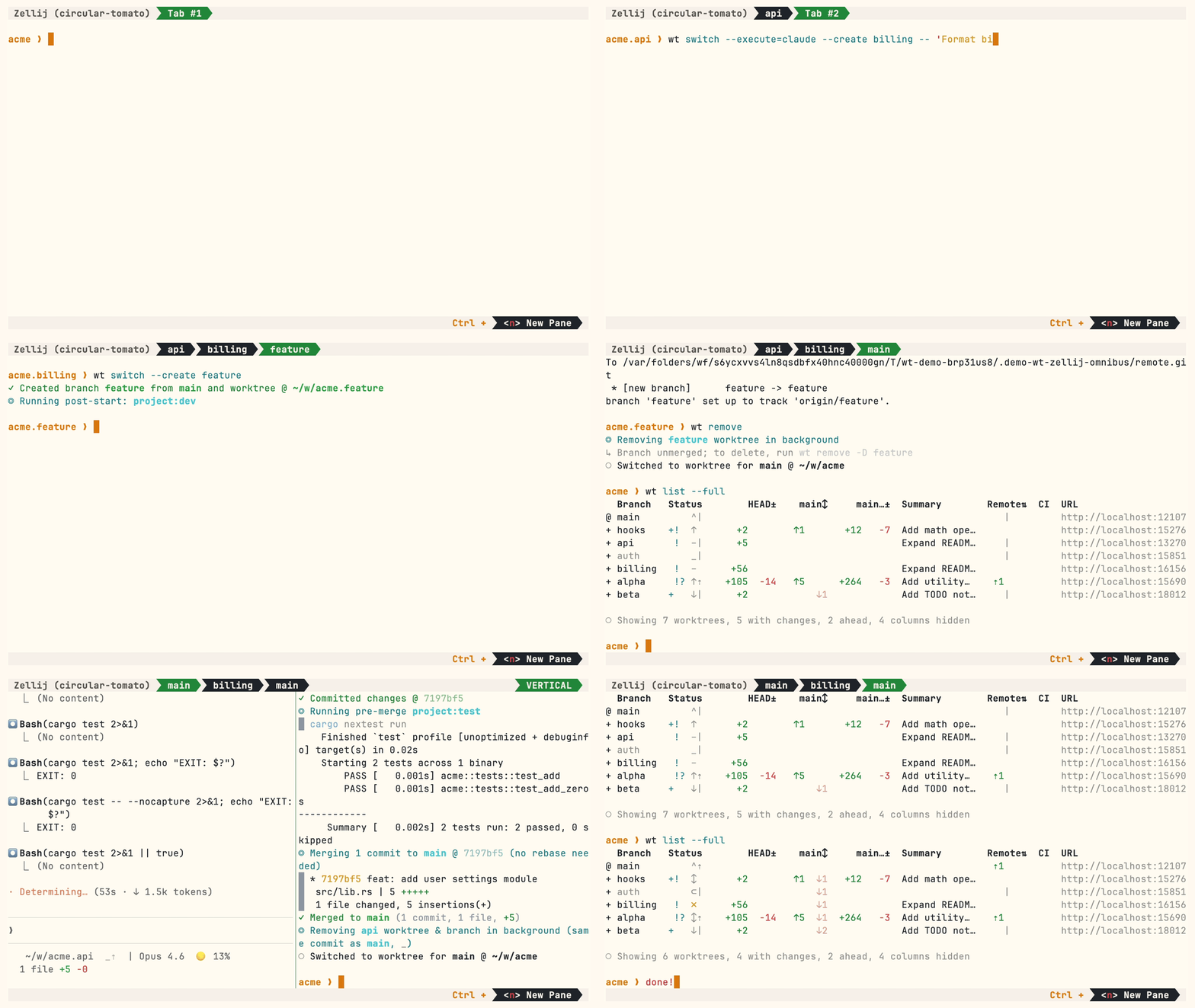
Multiple parallel agents, same simple commands:
Install
Homebrew (macOS & Linux):
brew install worktrunk && wt config shell install
Shell integration allows commands to change directories.
Cargo:
cargo install worktrunk && wt config shell install
Windows & other
Windows. wt defaults to Windows Terminal's command, so Winget additionally installs Worktrunk as git-wt to avoid the conflict:
winget install max-sixty.worktrunk
git-wt config shell install
Alternatively, disable Windows Terminal's alias (Settings → Apps → Advanced app settings → App execution aliases → "Terminal"/"Terminal Preview") to use wt directly.
Free code signing provided by SignPath.io, certificate by SignPath Foundation — policy.
Arch Linux:
sudo pacman -S worktrunk && wt config shell install
Conda / Pixi (community-maintained feedstock):
conda install -c conda-forge worktrunk && wt config shell install
Or with Pixi: pixi global install worktrunk && wt config shell install.
Quick start
Create a worktree for a new feature:
$ wt switch --create feature-auth
✓ Created branch feature-auth from main and worktree @ ~/repo.feature-auth
This creates a new branch and worktree, then switches to it. Do your work, then check all worktrees with wt list:
$ wt list
  Branch        Status        HEAD±    main↕     main…±  Remote⇅  Commit   Age   Message
@ feature-auth  +   ↑      +27   -8   ↑1       +31                4bc72dc  2h    Add authenticati…
^ main              ^⇡                                    ⇡1      0e631ad  1d    Initial commit

○ Showing 2 worktrees, 1 with changes, 1 ahead, 1 column hidden
The @ marks the current worktree. + means staged changes, ↑1 means 1 commit ahead of main, ⇡ means unpushed commits.
When done, either:
PR workflow — commit, push, open a PR, merge via GitHub/GitLab, then clean up:
wt step commit                    # commit staged changes
gh pr create                      # or glab mr create
wt remove                         # after PR is merged
Local merge — squash, rebase onto main, fast-forward merge, clean up:
$ wt merge main
◎ Generating commit message and committing changes... (2 files, +53, no squashing needed)
  Add authentication module
✓ Committed changes @ a1b2c3d
◎ Merging 1 commit to main @ a1b2c3d (no rebase needed)
  * a1b2c3d Add authentication module
   auth.rs | 51 +++++++++++++++++++++++++++++++++++++++++++++++++++
   lib.rs  |  2 ++
   2 files changed, 53 insertions(+)
✓ Merged to main (1 commit, 2 files, +53)
◎ Removing feature-auth worktree & branch in background (same commit as main, _)
○ Switched to worktree for main @ ~/repo
For parallel agents, create multiple worktrees and launch an agent in each:
wt switch -x claude -c feature-a -- 'Add user authentication'
wt switch -x claude -c feature-b -- 'Fix the pagination bug'
wt switch -x claude -c feature-c -- 'Write tests for the API'
The -x flag runs a command after switching; arguments after -- are passed to it. Configure post-start hooks to automate setup (install deps, start dev servers).
Next steps
- Learn the core commands:
wt switch,wt list,wt merge,wt remove - Set up hooks for automated setup
- Explore LLM commit messages, interactive picker, Claude Code integration, CI status & PR links
- Browse tips & patterns for recipes: aliases, dev servers, databases, agent handoffs, and more
- Extending Worktrunk — customize workflows with hooks & aliases
- Run
wt --helporwt <command> --helpfor quick CLI reference
Further reading
- Claude Code: Best practices for agentic coding — Anthropic's official guide, including the worktree pattern
- Shipping faster with Claude Code and Git Worktrees — incident.io's workflow for parallel agents
- Git worktree pattern discussion — Community discussion in the Claude Code repo
- @DevOpsToolbox's video on Worktrunk
- git-worktree documentation — Official git reference
Contributing
- ⭐ Star the repo
- Tell a friend about Worktrunk
- Open an issue — feedback, feature requests, even a small friction or imperfect user message, or a worktree pain not yet solved
- Share: X · Reddit · LinkedIn
📚 Full documentation at worktrunk.dev 📚